The Well-Tempered Computer, an introduction to computer audio

Showing posts with label software. Show all posts

Wednesday, December 21, 2011

FlacWavLoader with SoX SRC

For those who think WAV sounds better but like the convenience of a well tagged FLAC there is this little program by Mike Galusha.
It converts FLAC to WAV.
It writes the output to a folder but on systems with sufficient memory the file is cashed so memory playback too.
It calls your media player
The latest version also added SoX for resampling.

http://www.mikegalusha.com/
Price: freeware

Saturday, September 24, 2011

BitPerfect


BitPerfect is a simple high-quality audio player for OSX easy to use, audiophile grade music player that works with iTunes to deliver the highest possible sound quality.
  • Unobtrusive, minimal UI
  • Bit perfect output
  • Exclusive (hog) mode
  • Full memory playback with double-buffering to ensure continuous playback of large files
  • Automatic sample rate switching
  • Options for upsampling
  • Gapless playback
  • Integer mode (on supported DACs and supported versions of OSX)
  • Support for sound check
  • Playback from networked drives
  • FLAC support (via Fluke or other 3rd party iTunes FLAC importers) 
BitPerfect is for sale in the Mac App Store US$ 4.99

Friday, June 17, 2011

Interger mode explained

Damien Plisson, developer of Audirvana OSX music player software,  has published a white paper (in conjunction with AMR Audio of UK) explaining the importance of player software and Mac's playback Integer Mode.  As of writing, only Audirvana and PureMusic v.1.8 offer such capabilities with compatible DACs.

Abstract
In computer audio, the player software replaces the CD drive as the transport feeding the DAC. Ensuring bit‐perfect output of the original audio signal is a pre‐requisite, while minimizing jitter and RF interferences are still strongly needed. This paper explains the main factors impacting sound quality on the computer side, and the means that have been implemented in Audirvana player and the AMR DP‐777 DAC to boost the audio experience to the next level above the normal iTunes. These main means are bit-perfect, sample rate switching, asynchronous transfer and Integer Mode.
The white paper can be downloaded here.

Thursday, June 2, 2011

DigiBit Sonata Music Server Software

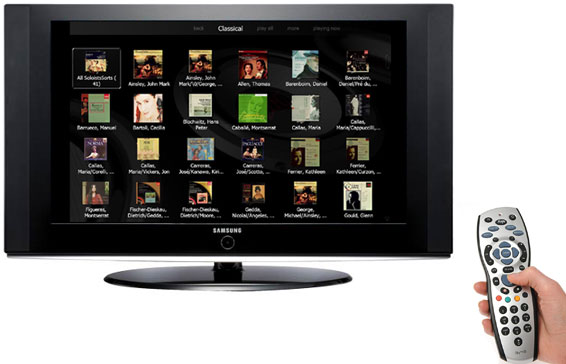
DigiBit from Madrid introduces SONATA Music Server, a specialized for classical music with audiophile capabilities.


Until now, many true music lovers had resisted switching to digital audio formats and buying downloadable music due to the lack of software and systems able to properly manage the complexity of classical music tags and its unavailability in good quality audio formats. 


Fortunately, more and more music labels are starting to offer downloadable music in the uncompressed FLAC format. The FLAC format provides CD quality or, even better hi-res master studio quality (24bits-96/192KHZ), but the limitation of all media players to handle only 4 or 5 metadata fields (album, artist, genre, track and, in some cases, composer), are insufficient for properly sorting classical music. This inadequate management of metadata has prevented the adoption of digital music by music lovers with thousands of CDs in their collections.


Designed for music lovers with little computer skills, the new SONATA Music Server is a sophisticated software specially designed to handle classical music (and any other genre). The SONATA allows you to select your preferred music the way you want: by genre, period, style, instrument, composer, work, conductor, orchestra, soloists, singers, music label, etc. This will allow users to rediscover in seconds many forgotten records in their music library. For example, you will be able to ask the SONATA to show all the records of Romantic music for Piano by Chopin placed by Claudio Arrau or the Opera records with Plácido Domingo conducted by George Solti or the Jazz records where Charlie Haden plays Latin music. Our proprietary and unique SonataDB and the GD3 database for classical music provide users access to over 40,000 classical CDs, with exhaustive information of each CD saved in 18 fields that, with the help of the also unique “Views” menus, will allow users to perform unique searches by filtering the music library using the most sophisticated combinations as stated above. Covert art is available in hi-res 1000 x1000 and 1400 x1400 format for most classical CDs and above 500 x500 for the rest of the genres.

The top of class CD ripper built-in provides access to metadata from 4 databases (GD3, SonataDB, FreeDB and MusicBrainz) thus, achieving superior metadata retrievals results.  Simple menus, multi-language and multitouch screen support and a very intuitive and easy-to-use GUI makes the learning curve almost inexistent. Selection and searches can’t be easier as the user will always be viewing the covers of the albums/tracks sorted by the criteria he/she had previously chosen.

If users already have part of their collection in digital format, the “Import and Copy” menus will automatically import the music library to the internal hard disk of the server.  SONATA supports up to 4 audio zones, that means users can listen to up to 4 different music programs in 4 different rooms at a time, or the same music in all rooms.


SONATA supports hi-res audio formats and the most advanced features to please the most demanding audiophiles users such as WASAPI and Kernel Streaming and play from memory for a perfect bit plays, thus, becoming a truly audiophile grade music server that supports up to 24bits-192Khz music files.

Besides, thanks to the DLNA/uPnP server, control point and renderer capabilities, user can stream music via LAN or wirelessly to any DLNA renderer such a low-cost or hi-end streaming player, TV, A/V receiver, etc.

Users can install SONATA in a Win 7 Tablet, and then make it a portable media player. As well DigiBit provides several software options to take advantage of the popularity of the iPhone/iPad/iTouch and Android devices so that users can use them to remotely control the music server or to stream music to them. An additional web interface –BitWeb+- allows users to remotely control the music server from any PC in the network.

The optional Sonata DUO software allows users to access their music libraries from wherever they are as long as internet connection is available, an invaluable feature when they’re in the move.

Sonata is available now at www.sonataserver.com for 99 Euros.  Users can download and try the SONATA for free for 30 days.

Wednesday, June 1, 2011

JPLAY puristic audio player for Windows

A brand new audio player for windows, JPLAY was built with only one goal in mind: optimal music reproduction. And that means no music management features, no eye-catching graphical user interface - only a fanatical focus on providing the best possible sound quality.  Its stripped-down, bare-bones playback engine fits entirely inside CPU cache and can be used as stand-alone player or together with popular 3rd party audio players, such as: JRiver Media Center, iTunes, foobar2000, mp3toys etc. 


JPLAY introduces a number of world's-first features for the ultimate Windows music playback. 
  • Full memory-based playback: most other memory-based players dynamically load tracks into memory during playback. In contrast, JPLAY pre-loads complete playlist into RAM guaranteeing no disk activity during playback (zero disk I/O)
  • Large Page Memory: superior memory management provides minimal CPU latencies
  • Maximum System Timer: reduce operating system latency by making Windows switch tasks faster. (0.5ms instead of default 15.6ms)
  • Maximum Priority Scheduling: ensure uninterrupted flow of music data by running music playback at highest possible priority
  • Hibernation Mode: cancel OS ‘noise’ by eliminating dozens of jitter-inducing processes and hundreds of threads
" JPLAY is the first and presently the only audio player, that can totally take control over Windows in a way that nothing else is allowed to run during playback - no processes, threads or services limiting sound quality. In hibernation mode JPLAY uses full power of the PC; all the CPU cores to provide not only bit-perfect stream, but more importantly - 'time-perfect'.
In music, timing is everything. And in digital audio doubly so: while producing bit-perfect output is easy, producing it at exact time required by digital formats (e.g. 32 bits every 22 microseconds for CD) is not. Why? Because while your PC may be really fast, it’s also doing hundreds if not thousands other things at the same time it plays music. With so many things going on, do you trust it will always ‘hit the beat’ at just the right time? Programming optimizations in JPLAY are designed to minimize both software and hardware interruptions in order to make it ‘easier’ for PC to ‘keep the rhythm’.
The player supports both 16-bit and hi-rez audio files in various lossless codecs; FLAC, WAV, AIFF.
"
JPLAY supports all Windows versions, either 32-bit or 64-bit. Single license costs 99 EUR. More info and free trial version are available at: www.jplay.eu

Monday, May 23, 2011

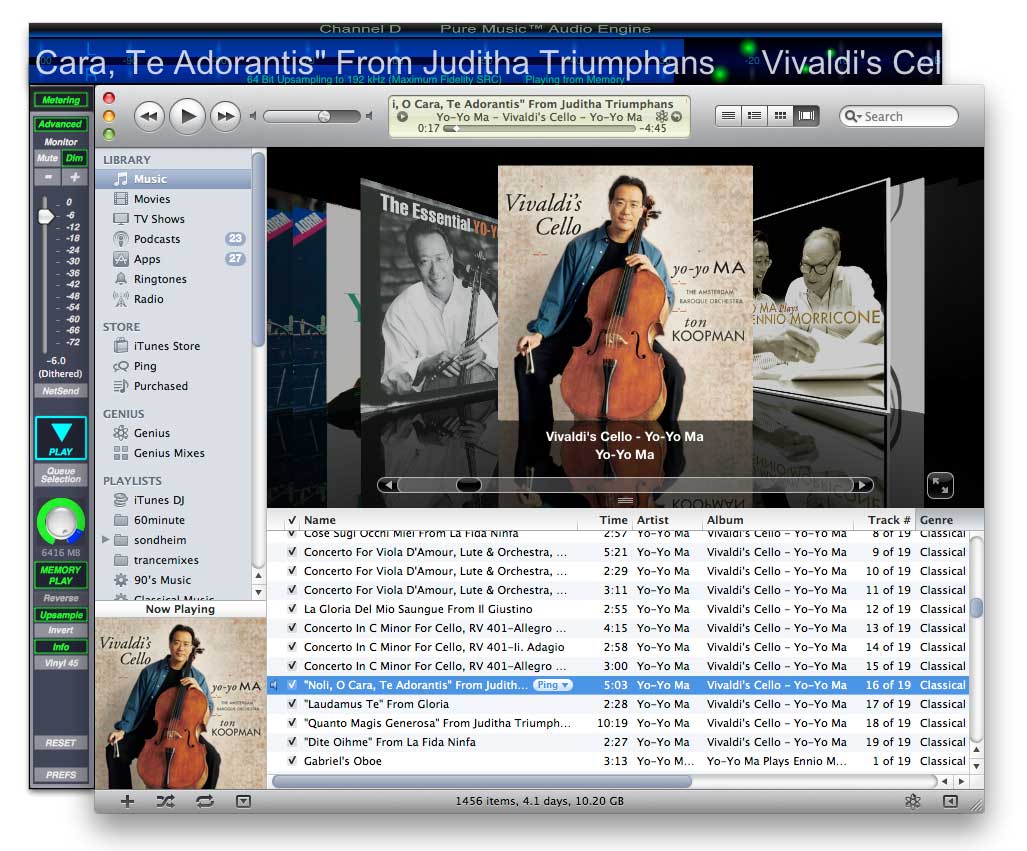
Channel D PureMusic 1.8

Channel D's PureMusic is a leading third party digital audio playback software for the Mac, and unlike many, it integrates or "docks" perfectly with iTune using the latter for library management function.  New version 1.8 will have several new features for instance the ability to directly play DSD format audio files at a user-designated PCM sample rate. DSD to PCM conversion is performed in real time during playback. 
A second new extremely innovative feature called "Playthrough" permits conveniently playing other computer audio sources (Internet radio, movies etc.) with full access to Pure Music’s dithered volume control, 64-bit crossover, audio EQ plug-ins, NetSend streaming, metering etc. 

Third, 1.8 will include nonmixable native integer stream format, or "Integer Mode" support, streamlining and bypassing all internal floating point operations on DACs which support nonmixable audio streams. 


Also included are overall usability improvements and correcting all known issues involving gapless playback including those involving Flac files. 

The PureMusic 1.8 update will be free for all users.

Other new features include:
• Menu options to disable all DSP options or disable DSP options except upsampling, mono and invert
• One-click feature to assist in configuring multiway crossover filters
• Option to set the range of the signal level meter (100, 60, 30dB)
• File format or sample rate conversion and adding flac tracks now operate on contents of folders
• gapless break and monophonic tag options in iTunes to denote preferred gapless album track breaks under low memory conditions or to automatically play tagged tracks in mono
• 33% more efficient memory usage with gapless albums
• now observes Repeat One in iTunes for selected track in any playlist
• Improved operation of NetSend connect on launch and disconnect options

Monday, April 25, 2011

Korg MR1000 mobile DSD recorder and AudioGate 2.0 software


For those interested in digital recording, Korg MR1000 mobile stereo DSD recorder is offered at a price  never before seen ($1,200) for such features and quality.

Future-proof Digital Recording
With the pristine fidelity, ultimate flexibility and advanced technology of a DSD recorder, the surprisingly affordable Korg MR-1000 is the stereo recorder that ensures your location recordings and final masters are never obsolete.

The mobile/tabletop MR-1000 delivers an astonishing 1-bit/5.6 MHz, doubling industry DSD recording quality standards. This new super-rate spec delivers a fidelity that will amaze even the most jaded audio enthusiast.

The MR-1000 is the perfect tool for the professional who wants to record and archive their final mixes in the studio, while its compact size and portability make it ideal for location recording, podcasting, live music performances - even for rehearsals and song-writing sessions.

After recording and editing all your tracks in the DAW/hardware system of your choice, you can mix directly, or via an analog summing mixer, to the stereo recorder. This gives you the superb fidelity of high-rate DSD technology, which preserves all the transients, nuances, and "air" from the original recording.

Powerful software bundled with this stereo recorder enables the conversion of your DSD recordings and mixes into all of today's audio formats without degradation. Best of all, by archiving your data/mix in this new double-speed 1-bit format you're ready for the future, as playback systems and standards change.

Real World Features in a Mobile and DSD Recorder
The MR-1000 can record to multiple formats, allowing you to choose the type that matches your needs. There are three ultra pristine, high definition 1-bit recording formats at your fingertips; DSDIFF, DSF, and WSD* (2.8224 MHz @ 1-bit or 5.6448 MHz @ 1-bit). In addition to the 1-bit recording options, multi-bit PCM formats (BWF or WAV) with resolutions up to 24-bit/192 kHz are also available. The MR-1000 can play back all of these file types and more, with the newly added MP3 playback feature. Various resolutions can be played back, including bit rates from 32 - 320 kbps, with a sampling frequency of either 44.1 kHz or 48 kHz. This gives you the added ability to store and listen to web ready MP3 files right on your stereo recorder. All of these functions make the MR-1000 a truly future proof tool that will be useful for recording all your endeavors in the years to come. It features a 40 GB internal hard drive, offering up to six hours of recording at the highest audio quality (1-bit 5.6448 MHz stereo), or approximately sixty hours at CD quality (16-bit 44.1 kHz).

The table-top MR-1000 location recorder includes combination XLR/ 1/4" input connectors with top quality microphone preamps, phantom power and built-in limiting. Both XLR and RCA outputs are provided for maximum flexibility.

High-speed USB 2.0 connectivity provides for fast and easy transfer of files between the recorder and your computer.

The MR-1000 can accommodate a total of 800 projects internally, and you can easily perform file management operations such as Rename, Delete, and Protect for individual songs. You can also register one hundred mark points in each song.

Designed for High Audio Quality
In order to deliver an unprecedented level of audio quality, careful attention was paid not only to the digital signal domain but also to the hardware design of this stereo DSD recorder. The input/output circuitry of the MR-1000 features ultra-high quality mic preamps. Power is supplied independently to the MR-1000's digital circuitry and analog circuitry, thus holding interference due to electrical current to an extremely low level.

Every component of the MR-1000 has been carefully selected to maximize performance. The respected Cirrus Logic CS4398 is used as the DAC (Digital/Analog Converter), and the Burr-Brown PCM4202 from Texas Instruments is used as the ADC (Analog/Digital Converter). By paying close attention to every component, the design has minimized any possible degradation of the audio signal.

Quality and Portability
The MR-1000 allows two-way operation; and this DSD stereo recorder can be powered by the included AC adaptor or by eight AA batteries, delivering 1-bit audio in a portable package that's equally at home in the studio or in the field. It comes with a specially-made carrying case that lets you record without removing the MR-1000 from the case, making it a great choice for field recording. The large backlit LCD display guarantees excellent visibility while, ensuring smooth workflow. The Almite-coated aluminum body provides strong impact resistance and stable operation in any situation.

1-bit Technology Equals Pristine Fidelity
1-bit recording is the latest advancement in audio, and has been adopted for use in the critically acclaimed SACD recording format. It offers a frequency response of DC to 100 kHz and dynamic range of 120 dB. This uncompromising fidelity, low noise floor, extended dynamic range, lifelike imaging and analog quality depth has been praised by top experts. But there are other important advantages to the format of this stereo recorder that are of benefit to all recording professionals, regardless of their tracking platform.

Future Proof Flexibility
Today's state-of-the-art 24-bit converters use high-speed 1-bit conversion to capture audio, using real-time decimation and other processes to present the data in the desired bit depth/sample rate format. The beauty of the MR's bitstream format is that it uses the original 1-bit data, without the need for the other processes. What comes in comes out, with no manipulation needed.

As files are converted and reconverted between various bit depths and sampling rates, there are possibly degrading effects, depending on the sample rate conversion algorithms. The critical issue is that files mixed and mastered in today's state of the art high-resolution audio may be insufficient for tomorrow's formats. Archiving your final mixes and masters in a 1-bit system allows you to bypass these issues, and preserve your music with both the highest fidelity and in a more "universal" format. That data then can more easily be converted at a later date to the bit depth/sample rate format of your choice without compromising the integrity or fidelity of the data. You can even convert to newer formats that will be adopted in the future, be they multi-bit or a further migration to the 1-bit format.


Korg’s free AudioGate 2.0 software is your bridge to translating your MR1000's DSD recordings into different file types; as well as to importing files from a variety of sources. 


For Version 2.0, you can now import and export in the following formats: WAV - BWF - AIFF - MP3 (export Windows only) - AAC (export Mac only, Flip4Mac WMV required) - Apple Lossless (export Mac only) - WMA (including WMA Professional and WMA Lossless – export Windows only) - DSDIFF - DSF - WSD.  AudioGate 2.0 also adds FLAC file support – the most popular lossless form of data compression.
DSF (DSD Stream File)
This is a DSD file format supported by some Sony "VAIO" personal computers (models with the "Sound Reality" engine) sold since September, 2005. This format is already supported by software such as "SonicStage Mastering StudioVer.2.0" and "DSD Direct," and it is expected that increasing numbers of software titles will support it in the future, including shareware and freeware. 
WSD (Wideband Single-bit Data)
This is a 1-bit audio file format created by the "One-bit Audio Consortium." It accommodates all formats of one-bit audio data without limitation of channel number or sample rate. The "One-bit Audio Consortium" was established in 2001 with the goal of contributing to the advance of audio through research, development, and popularization of 1-bit audio technology, and its work is currently supported by more than sixty members.
In addition to editing features like gain, fade, balance, and DC cut which AudioGate previously included, you’ve now got some new ones. “Normalize” automatically adjusts so that you can export files at their highest level without clipping. Plus, we’ve not only improved the output level range from ± 24 dB to ± 60 dB, but we’ve also expanded the peak level metering for better visual monitoring.

AudioGate 2.0 ensures that you get great-sounding results when you down-convert from one sample rate/bit depth to another. It now includes standard TPDF (Triangular Probability Density Function) dithering, plus Korg’s own enhanced “AQUA” dithering that closely follows human hearing characteristics for much more musical and natural sounding results.

You can use the tools listed above and now burn your own audio CDs, complete with CD-Text. But since you’re recording with an MR Series recorder, we know you are into the latest and highest quality technology out there. We’re right there with you. Now you can use AudioGate 2.0 to create DSD audio discs (1-bit/2.8 MHz) that preserve the superior audio fidelity that only 1-bit recording can deliver. You can play these enhanced discs in a variety of devices – Sony PlayStation, VAIO computers, and certain stand-alone DVD players.

Mac: AudioGate_v2.0.1

Windows: AudioGate_v2.0.1


Wednesday, April 13, 2011

Fidelizer optimizes Windows for audiophiles

Fidelizer (v.1.4) will instantly turn your Windows Vista/7 computer to audiophile workstation for sophisticated audiophile player like J River, XXHighEnd, HQPlayer, foobar, etc. It involves no permanent modifications so system will remain safe and sound after restart so even system with normal Windows installation can experience better sound quality when needed. 


Why stopping services? Aren't my specs are good enough to handle them all?
Although you might have decent CPU, tons of RAM or even with SSD drive. However, these services are fighting each other to get processor resources and many of them relies on fixed hardware connections which have limited capacity to make solid performance. Stopping services will minimize work-load of svchost controllers, freeing more resources for allocation and improve system responsiveness. If stopping services sounds little too scary, you can skip this process as it's not the most important features after all.

It seems some features like stopping services are missing in this version. Are you trying to reduce features?
From what I've seen in concepts, I thought it should be 100% safe for any machine to use it. However, stopping most system services can cause unexpected problems in some machines. I got reports about Fidelizer breaking some applications and services, heavily slow down system because of recent updates in 1.2, etc. So I decided to take them off to ensure this program will 100% safe for yourself. However, I added something new that can be very effective in return and no one ever make it this far before too.


What does Fidelizer do in optimizing threads, I/O and random stuff like priorities and resources scheduling? Are they just made up for placebo effects?
Since Windows Vista, Microsoft introduced Multimedia Class Scheduler for thread and I/O priority optimization for processor resource scheduling. Most dedicated audio/video applications will benefit from this and it also affect overall system/network performance too. Default configuration are quite terribly optimized and not enough people going to take this feature serious enough to findout how I can get better sound through this. Fidelizer will do it for you without affecting real configuration so everything will still work fine after system restart.
I saw system thread priorities and clock resolution in another option. Aren't they the same to ones in resource scheduler?
Although Microsoft made pretty good resource management tool like that. However, it couldn't controll the whole system down to specific process and thread. This program will do additional works to ensure best sound reproduction with lowest possible latency in software and hardware I/O which can loosen up the continuity of bit-stream though it's performing bit-perfect. It'll enforce audio thread to highest level possible and reduce non-important processes and threads to lowest possible level for more throughput to audio thread. It also adjusts system clock resolution (NT Timer) down to lowest possible level for most accurate timing reference to improve stability of audio playback at lower latency.

I use DPC Latency Checker but Fidelizer doesn't improve system latency at all. Isn't it scam?
Graph in system latency shows latency of hardware I/O meaning you're checking hardware latency. Fidelizer will decrease software latency in operating system so DPC Latency Checker isn't capable of checking software latency. You need to test it with other methods. If you want to decrease hardware latency in DPC Latency Checker, try disabling drivers like networking for example.

If DPC Latency Checker is out of the game, how can I measure the difference in scientific way then?
You'd need high quality hardware and intensive measurement methods to make clear cut. Let's just believe in Microsoft that they didn't make stuff like Multimedia Class Scheduler just to fool pro audio market. If you're really desperate to do so, just try it with your ears, if you're unsatisfied or can't hear the difference, just delete it since it won't cause any changes to your system anyway.

Monday, April 4, 2011

Audirvana OSX audiophile player 0.8


Damien Plisson's Audirvana OSX audiophile player release 0.8.0 is available for download.  The open source Mac-only music player was covered in our previous article and is still free to download and use, although donations are welcome to keep the development going.

To us, it is one of the best player available especially if you run your file exclusively (hog mode), from RAM (memory playback), and connect to your USB DAC using its "integer mode" bypassing Apple CoreAudio 32-bit floating point calculations with direct data transfers.  This last feature is unique among various currently available music playing softwares.

Monday, February 14, 2011

Audirvana music player 0.6.1, with integer mode

New beta release of Damien Plisson's Audirvana music player for Mac OS X is the first to provide integer mode processing. From our preliminary listening session showed that it is superior to anything else we have heard. For those of you who still doubt that softwares do make a difference, download and try it for free.


The USB DACs and SPDIF converters using the Streamlength code (such as Wavelength, Ayre, and Halide Bridge) are known to provide support for integer mode which talks to the driver in the DAC native data format (e.g. 24bit signed Integer) instead of using the Apple's CoreAudio intermediary standard 32bit float format.

Still in beta stage, the open source software still have some bugs and glitches. Help report them would even make it better.

@wgscott over at computeraudiophile.com wrote a nifty Apple script to enable control of Audirvana (and Decibel) via Apple's iphone/ipad Remote app.

Sunday, February 6, 2011

Fidelia music player for OS X

Yet another new music player.  Audiofile Engineering, maker of the fine Wave Editor software which we covered in an earlier post, is launching a Fidelia, a Mac OS X music player which does upsampling and dithering on the fly using industry standard iZotope's algorithm. Seems like it has the best features out there.  We will be testing it soon to see how does it compares sonically to competing OS X players like Amarra, Pure Music, Decibel and Audirvana.  Beta testers who were using Fidelia under its previous "Twilight" name, reported excellent sound quality.


  • Fidelia takes advantage of Apple CoreAudio, Quartz, and other solid OS X features
  • Supports AIFF, WAV, CAF, AAC, Apple Lossless, Ogg Vorbis, MP3 and FLAC, also convert existing files to and from any
  • Seamless access by importing your iTunes library, including user-generated playlists
  • iZotope's 64-bit Sample Rate Converter featuring a hybrid ringing control enabling a compromise between the standard pre-ringing of a linear phase filter and the post-ringing of a minimum phase filter with unlimited sample rate support (including 44.1kHz, 96kHz, 192kHz, and higher)
  • iZotope's MBIT+ dithering algorithm (Audiofile Engineering claims that this is the best sounding dither on the market - making digital domain volume control a real contender for serious listening)
  • Fidelia remote app ($10 available from Apple Appstore) for iOS turns your iPhone or iPod touch into a full-featured remote control
  • $119 Price to be announced
Update: The base program is $20.00 The Advanced program that includes hog and advanced settings for iZotope SRC is an addtional $50 in the Add-on store.


Tuesday, February 1, 2011

Decibel music player for Mac OS X


Stephen Booth,  developer of the excellent Max CD ripper and Play, has relaunched Ayrewave as Decibel.  It is free to try , but will be the first program that Stephen will charge some money (full version US$33) for his effort which I think make sense given that Amarra and Pure Music retails for quite a bit of money.
  
Decibel was developed with inputs from Charles Hansen of Ayre and Gordon Rankin of Wavelength audio - the leader in asynchronous USB implementation for audio.  I think the reason for the new name is that other audio equipment manufacturers may not want to recommend using it with "Ayre" and "Wave" in its name.  


Decibel supports all popular lossless and lossy audio formats including FLAC, Ogg Vorbis, Musepack, WavPack, Apple Lossless, AAC, MP3, WAVE and AIFF. 
For lossless formats such as FLAC and WAVE, and for Ogg Vorbis and specially tagged MP3 files, Decibel supports gapless playback with seamless transitions between tracks.  Decibel has an intentionally minimal user interface designed to be instantly intuitive and non-intrusive. 
Decibel processes all audio using 64-bit floating-point precision, providing the highest possible playback quality for files sampled at all bit depths.  (Best to boot your Mac in 64-bit kernel, by holding down "6" and "4" keys while booting, or use the nifty little StartModeSelector program)

For audiophile users desiring more control over their audio, Decibel can take exclusive control of the output device (using hog mode) and send audio in the device's native format. Additionally, Decibel can automatically adjust the output device's sample rate to that of the playing track, preventing audio quality degradation associated with software sample rate conversion.  Finally, Decibel can load and play files entirely in memory, eliminating audio glitching associated with disk access.

Saturday, January 29, 2011

Software upsamplers

Why? And you thought NO oversampling supposed to be best? OK, yes when you can avoid it.  Today, most d/a chips - including the best ones - are of the sigma-delta types which up/oversampling is embedded into the design, otherwise you would be left with horrendous noise in the output signal.


Upsampling itself can not create information that was not already there, just like blowing up 1m pixels file to poster proportions.  So here the point is not to create faux information, but it is there to move noises out of the audio band.  All of this usually happens in the oversampling digital filter (usually an integral part of the d/a chip, some are custom and external).  The noises, now moved high up out of the audio band, are then filtered out.  The filter can be a brick wall type, at say 22kHz ( good frequency response, but bad phase response), or a slow roll off minimum phase type.  In multi-bit DAC, this filter is normally analog, but for a sigma-delta dac, it is done in the digital domain.


Hardware oversampling in digital filters are not the best, even in the best DACs, because of all the computations that has to be done in real time.  The more sophisticated DACs uses custom, outboard digital filter to do the job, but since we're sending music to DACs from our computers - there's also the software upsampler route.  Sending the DAC an already up-sampled high resolution file gives the hardware digital filter an easier job, sometimes bypass its upsampling work almost completely.


Industry standard software upsamplers or sample rate converters (SRCs) are Weiss Saracon and Izotope RX.  They are used in mastering studios and expensive.  For PC users, there are quite a number of other alternatives, including on-the-fly upsamplers such as the XXhighend player (design to work in conjuction with the Phasure NOS no filter DAC) and Sygnalist's HQplayer.  For a Mac user like me, there is the Wave Editor from Audiofile Engineering for $79.


Wave Editor uses Izotope's upsampling algorithm with options to adjust, among other things, bit depth, sampling rate, filter slope, pre-ringing.   There is also the Sample Manager, a batch processor from the same company but with less options.  However, the only thing Wave Editor does not do is real time on-the-fly upsampling.  Wave editor takes about a minute to convert a file.  If you want to do on-the-fly upsampling, Apple CoreAudio is good, but not good enough.  Check out src.infinitewave.ca which shows charts of various SRCs.

iZotope SRC sweep
iZotope SRC minimum pre-ring
Pure Music and Amarra supposedly has better built-in SRCs and are worth the price they are charging for their hard work.  There are also the new Audirvana (still in alpha stage, open source, and free) utilizes Secret Rabbit Code libSampleRate algorithm which also open source, free, and sounds great.

Audirvana
As I am writing this blog, I am running Audirvana, which upsamples to 32-bit/ 192kHz, via 32-bit asynchronous USB transfer to Calyx Audio DAC (16 x ESS 9018 32-bit DAC chip, the only chip that can accept true 32 bit data path).  The sound? It's a glimpse of audio nirvana!


Calyx DAC

Sunday, January 9, 2011

McIntosh free AP1 Audio Player for iDevices

McIntosh Laboratory is offering iPhone and iPad users the opportunity to enjoy an iconic McIntosh experience anywhere and anytime with its new AP1 Audio Player iPod/iPhone/iPad App, available now for free download at the iTunes Store. Designed to give McIntosh fans a familiar look and feel, the AP1 Audio Player offers virtually all features of the existing iPod App, while tailoring the portable playback/control experience for the unique McIntosh style. 


Notably, when not used as a controller, the AP1 will default to a McIntosh “Meter Display Mode” and act as a live meter display for the music, in effect, providing users with a backdrop consistent with the iconic “McIntosh Blue” LED watt meter – a recognized hallmark of audio excellence. The App will function independent of any external hardware (i.e. Dock) and allow a portable McIntosh experience for all iPhone and iPad users. When used with an iPod Dock (of any make or model) the App serves as a virtual McIntosh display, reflecting the company’s renowned brand, style and experience.

Monday, January 3, 2011

PS Audio's eLyric™ Music Manager pre-Beta release

PS Audio is providing pre-beta release of the eLyric Music Manager.  The free program is full featured powerful music management application.  


From PS Audio's website:


Introducing the most powerful music management and player application available for the serious music crowd,eLyric™ . It’s full-featured and effortless to use. And it’s free, from PS Audio.
eLyric™ is a powerful, convenient, well-supported desktop music manager, player, and soon, hi-end music store. Best of all, it connects serious music listeners - hundreds of thousands around the world - into an active, sharing community.
eLyric offers all the convenience of applications like iTunes, but with a host of extra features and compatibilities that people with high quality components and sophisticated musical tastes need-and haven’t been able to get yet.
Got a large digital music collection? A classical - or jazz-focused collection? A taste for hi-resolution audio? A network of high-end components, or perhaps just a highend DAC? Chances are, you need eLyric to turn your collection into a convenient, networked listening paradise with no compromises.
eLyric works on PCs or Macs. It lets you to manage your impressive digital music collections in ways you couldn’t before, no matter what format, how large, or where you store them. It’s UPnP compatible so you can stream your music through just about any high-quality hi-fi components you want to connect in your network, or just simply play it on your computer or receiver.

And did we mention…it’s free ?                  
If you are a serious music appreciator, eLyric:
-       serves higher fidelity formats
-       works for larger music libraries
-       delivers greater organizational capabilities than most applications
-       offers universal (UPnP) compatibility so you can connect to any UPnP components
-       Delivers more artist and recording information
-       Connects you to a community of hi-end music lovers
-       and will soon offer hi-res music shopping, one-click downloading, and other features
It’s just what you need to start building, or to complete, your high-fidelity music paradise. 

Thursday, December 30, 2010

Great softwares from Rogue Amoeba

Great collection of softwares (mostly for Mac) from Rogue Amoeba.  Everything is free to try with some features disabled.  All of them is $25-$32 to buy.


Airfoil (For Mac and Windows): Play any audio across your network to a whole host of devices, all in sync! Airfoil sends audio to remote speakers including iOS devices, other computers, and hardware devices like the Apple TV and AirPort Express. Airfoil for Mac gives you any audio, everywhere.


Audio Hijack Pro: Record any audio - three simple words to explain Audio Hijack Pro. Record from applications like iTunes, Skype or DVD Player. Record from microphones, Radiosharks and other hardware. If you hear it, you can record it.


Pulsar:  XM and SIRIUS both provide online access to most of their stations, but tuning in with a browser is clunky at best. With Pulsar and an XM or SIRIUS online account, you can access all this great content directly from your desktop!


Radioshift!: With Radioshift, you can listen to and record internet and AM/FM radio from around the world on your schedule.
Nicecast: The easiest way to broadcast music from OS X. Broadcast to the world, or just across your house. Nicecast can help you create your own internet radio station or allow you to listen to your iTunes Music Library from anywhere in the world


Fission: Streamlined audio editing, you can quickly copy, paste and trim audio, as well as split files. Fission also works with compressed MP3 and AAC formats to edit without the quality loss caused by other editors. Get perfect quality audio when editing natively in the MP3, AAC, Apple Lossless, AIFF and WAV formats.